
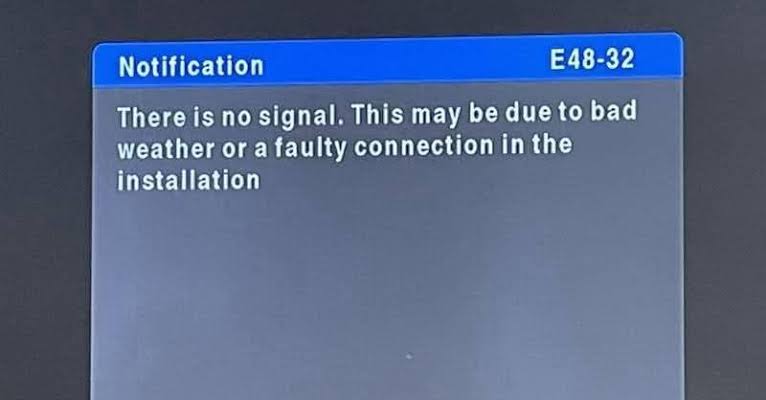
If your DSTV decoder is showing Error E48-32, it simply means your decoder is not receiving any signal from the satellite dish. This is one of the most common DSTV problems in Nigeria, especially during rainy season, heavy wind, or when the dish has shifted.
The good news is that DSTV Error E48-32 can be fixed, and in many cases, you can solve it yourself without paying any technician.
In this guide, you will learn what DSTV Error E48-32 means, why it happens, and the exact steps to fix it.
What Does DSTV Error E48-32 Mean?
DSTV Error E48-32 means:
“No Signal”
In simple terms, it means your decoder is not receiving signal from your DSTV dish, so it cannot display channels.
When this happens, your screen will show:
- E48-32
- No Signal
- Searching for signal
Common Causes of DSTV Error E48-32 in Nigeria
Here are the major reasons Nigerians experience this issue:
1. Heavy Rainfall or Bad Weather
Rain can block satellite signals temporarily. This is common during rainy season.
2. Dish Has Shifted
Strong wind can slightly move your dish, and even small movement can cause signal loss.
3. Loose Cable Connection
If the cable at the back of the decoder or at the dish is loose, the decoder will lose signal.
4. Faulty LNB (The Head of the Dish)
The LNB is the small device attached to the dish that receives satellite signal. If it is damaged, you will get no signal.
5. Damaged Cable
A cable may get cut, damaged, or worn out over time, especially if exposed to sunlight and rain.
6. Decoder Tuner Issue
Sometimes the decoder itself may have a fault, especially if it has been exposed to power surge.
7. Wrong Satellite Settings
If someone mistakenly changed your satellite settings, the decoder may stop receiving signal.
How to Fix DSTV Error E48-32 in Nigeria (Step-by-Step)
Below are the best methods to fix the problem.
Step 1: Check If It Is Weather Related
First, check the weather condition.
If it is raining heavily or there is storm:
- Wait 10 to 30 minutes
- The signal may return when the weather clears
This is because rain can temporarily weaken satellite signal.
If the rain has stopped and you still have E48-32, move to the next step.
Step 2: Restart Your DSTV Decoder
Sometimes, the decoder may need a reboot.
To restart:
- Switch off the decoder
- Unplug it from power
- Wait for 2 to 5 minutes
- Plug it back
- Turn it on
Check if the signal returns.
If not, continue.
Step 3: Check the Cable Connection Behind the Decoder
This is one of the most common causes.
At the back of your DSTV decoder, you will see a cable connected to the port labelled:
- LNB IN
- Satellite In
Do this:
- Switch off the decoder
- Unscrew the cable gently
- Clean the connector if it has dust or rust
- Screw it back tightly
Make sure it is properly fitted.
Now switch on the decoder and check again.
Step 4: Check Cable Connection at the Dish Outside
If you can access your dish safely:
- Check the cable connected to the LNB
- Ensure it is not loose
- Ensure it is not rusty
If the connector is exposed, water may enter and damage it.
A wet or rusty connector can cause E48-32.
Step 5: Check Your Signal Strength and Quality
DSTV decoder has a built-in signal checker.
To check signal:
- Press Menu on your remote
- Go to Settings
- Select Satellite Settings
- Choose Signal Information
You will see:
- Signal Strength
- Signal Quality
What Signal Level Is Good?
- Strength above 50% is okay
- Quality above 60% is good
If both are 0% or very low, your dish is not aligned properly or there is a cable/LNB issue.
Step 6: Inspect the LNB for Damage
The LNB is the small device at the front of your dish that collects signal.
Check if:
- It is broken
- It is hanging loosely
- It has water inside
- The cable connector is rusted
If your LNB is damaged, you will need to replace it.
In Nigeria, DSTV LNB replacement cost depends on your area, but it is usually affordable compared to buying a new decoder.
Step 7: Check If the Cable Is Cut or Damaged
Cable damage is common in Nigeria because:
- Sun heat weakens cables
- Rats sometimes bite cables
- People accidentally step on or cut it
Inspect the cable from the dish down to the decoder.
If you notice:
- exposed wire
- cuts
- broken cable
Then you need to replace the cable.
Step 8: Adjust the Dish Alignment (If You Know How)
This is the main fix when E48-32 is not weather-related.
A small shift in the dish direction can cause signal loss.
How to Adjust DSTV Dish (Simple Method)
- Ask someone to stay inside watching the TV signal screen
- Slightly move the dish left and right slowly
- Tighten it once signal improves
- Then adjust it up and down gently
- Tighten all bolts firmly
Important:
- Do not move it aggressively
- Small movements are enough
Once the signal quality rises, the channels will return.
If you do not know how to do this, it is better to call a technician to avoid making it worse.
Step 9: Check Satellite Settings (Very Important)
Sometimes, wrong settings can cause no signal.
To confirm correct settings:
- Press Menu
- Go to Settings
- Select Satellite Settings
- Choose Home Network
- Ensure your settings are still on DSTV recommended values
If settings were changed, restore default settings.
Step 10: Test Your Decoder With Another Dish (If Possible)
If you have a neighbour using DSTV, you can test your decoder on their dish temporarily.
If your decoder works on their dish, it means:
- Your dish alignment is wrong
- Your cable or LNB is faulty
If it still shows no signal, your decoder may have tuner issues.
When You Should Call a DSTV Technician
Call a technician if:
- Your dish is on a high roof and unsafe to reach
- Your signal strength is 0% after checking cables
- Your LNB looks damaged
- Dish alignment needs professional adjustment
- Cable needs replacement
How to Prevent DSTV Error E48-32 in the Future
To reduce the chances of no signal problems:
1. Tighten Dish Bolts Properly
Loose bolts allow the dish to shift easily.
2. Use Quality Cable
Cheap cable weakens signal and spoils quickly.
3. Protect Cable Connectors From Rain
Use insulation tape to cover connectors.
4. Replace Old LNB
Old LNBs can stop working suddenly.
5. Use Surge Protector
Power surge can damage decoder tuner.
FAQs About DSTV Error E48-32 in Nigeria
Can Rain Cause DSTV Error E48-32?
Yes. Heavy rain can block satellite signal temporarily.
Why Does DSTV Lose Signal Only at Night?
This may happen if:
- Dish alignment is weak
- LNB is faulty
- Cable is weak
- Weather affects signal at certain times
How Much Signal Strength Does DSTV Need?
DSTV usually works best when:
- Signal strength is above 50%
- Signal quality is above 60%
Can a Bad LNB Cause E48-32?
Yes. If the LNB is faulty, the decoder will show no signal.
Can I Fix DSTV Error E48-32 Without Technician?
Yes, if it is caused by loose cable or small dish movement. But if alignment is badly affected, technician may be needed.
And Finally
DSTV Error E48-32 in Nigeria simply means your decoder is not receiving signal from the dish.
To fix it quickly:
- Check if rain is affecting it
- Restart decoder
- Tighten cable behind decoder
- Check cable at the dish
- Check signal information
- Inspect LNB
- Adjust dish alignment carefully
- Call a technician if needed
Once your dish signal is restored, the error will disappear and your channels will return.