
If your DSTV decoder is on but it is not showing channels, it can be very frustrating. Sometimes the screen may be blank, some channels may disappear, or you may only see a few channels like Channel 100.
Many Nigerians face this issue after subscription renewal, after power failure, after scanning, or when the decoder settings have been changed.
In this guide, you will learn why your DSTV decoder is not showing channels and the exact steps to fix it quickly.
Why Your DSTV Decoder Is Not Showing Channels in Nigeria
There are several reasons why your DSTV decoder may stop showing channels. Below are the most common ones.
Your subscription has expired
If your subscription has expired, most channels will disappear and you may see an error like E16 or E143.
Payment has not reflected
Sometimes you may pay but the subscription has not activated yet.
Poor signal or dish problem
If your signal is weak, the decoder may not display channels properly.
Some channels are not included in your package
If you changed to a lower package, some channels will not be available.
Decoder needs reset or refresh
Sometimes the decoder needs an authorization message from DSTV.
Wrong satellite settings
If someone changed your satellite settings, your channels may disappear.
Decoder is stuck or has software issue
A system glitch can cause the decoder to behave abnormally.
Faulty LNB or cable issue
If the LNB is weak or the cable is damaged, you may lose channels.
How to Fix DSTV Decoder Not Showing Channels in Nigeria
Follow these steps one after the other. Most times, your channels will return before you complete all the steps.
Step 1: Check If Your DSTV Subscription Is Active
The first thing is to confirm if your subscription is still active.
If your subscription has expired, your decoder will not show channels.
You can confirm subscription status using: MyDStv App
DSTV website
Payment SMS confirmation
Customer care
If it is expired, renew your subscription first.
Step 2: Restart Your DSTV Decoder
Restarting can solve temporary decoder issues.
To restart: Switch off the decoder
Unplug it from power
Wait for 2 to 5 minutes
Plug it back
Switch it on and allow it to boot
After it comes on, check if the channels have returned.
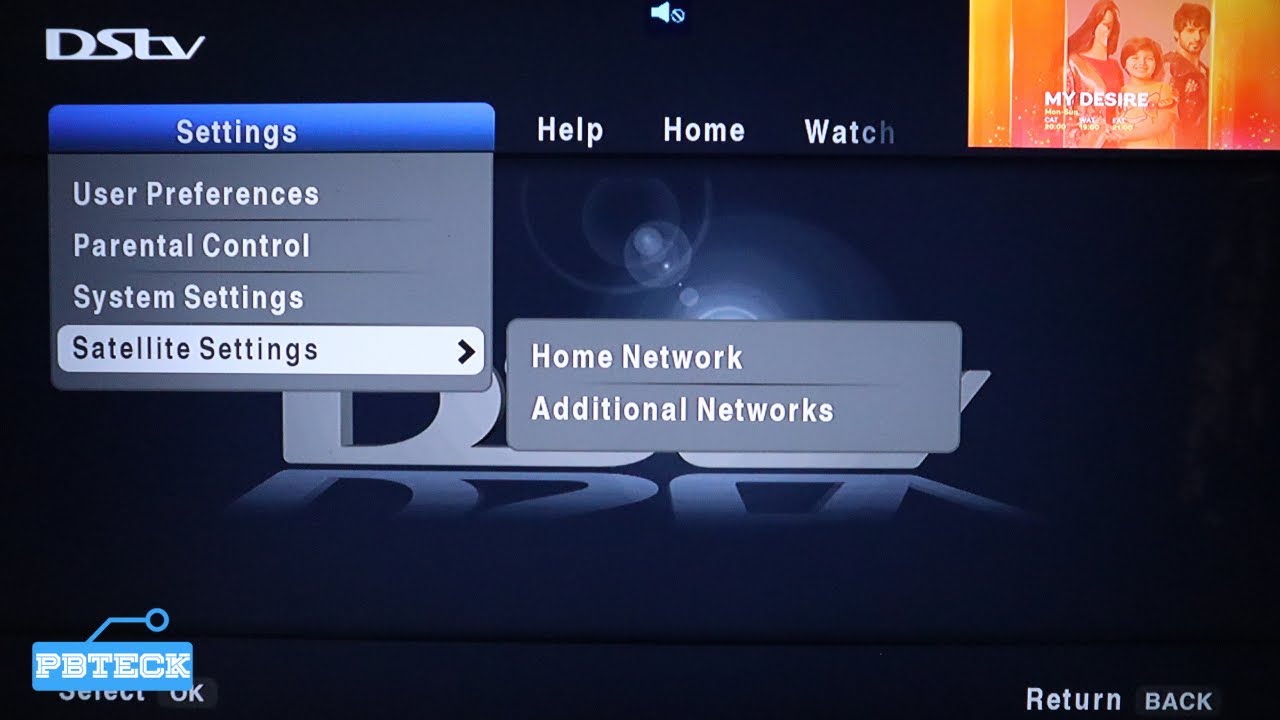
Step 3: Check If Your Decoder Has Signal
DSTV decoder needs strong signal to show channels.
To check your signal: Press Menu
Go to Settings
Select Satellite Settings
Tap Signal Information
If signal strength or quality is very low, your channels may not show properly.
If you are seeing No Signal or Error E48-32, then you need to fix your dish alignment, LNB, or cable.
Step 4: Confirm You Are Watching the Correct Channel List
Sometimes, the decoder may switch to another channel list or favourites list.
To check: Press the OK button on your remote
Look at the channel list
Make sure you are on All Channels and not Favourites
If you are on favourites, it may show only few channels.
Step 5: Reset Your DSTV Decoder Using MyDStv App
If your subscription is active but channels are not showing, you need to reset your decoder.
This is one of the most effective fixes.
To reset: Open MyDStv App
Login
Tap Manage
Select Reset Decoder
Choose your smartcard number
Tap Reset
After resetting, leave the decoder switched on.
Step 6: Leave the Decoder on Channel 100
After reset, DSTV needs time to send authorization signals.
Do this: Switch to Channel 100
Leave the decoder ON
Wait for 10 to 30 minutes
Many people make the mistake of switching off the decoder quickly, which delays activation.
Step 7: Check If You Subscribed to the Correct DSTV Package
Sometimes you may think your channels are missing, but the truth is that your package does not include them.
For example: DSTV Compact has more channels than DSTV Padi.
So if you downgraded, some channels will disappear.
Confirm your bouquet on: MyDStv App
DSTV account page
Payment receipt
If you want those channels back, upgrade your subscription.
Step 8: Check If Some Channels Are Temporarily Off Air
Sometimes DSTV removes channels temporarily for maintenance or changes.
If only one channel is missing, it may not be your decoder fault.
Try switching to other channels to confirm.
Step 9: Rescan or Refresh Channels (If Applicable)
Some DSTV decoders may require channel refresh.
You can try: Going to Menu
Settings
Satellite Settings
Home Network
Then follow on-screen instructions
If you are not sure, do not change advanced settings, because wrong settings can remove channels completely.
Step 10: Check Your Smartcard and Decoder Slot
If the decoder is not reading the smartcard properly, it may not show channels.
To fix: Switch off the decoder
Remove the smartcard
Clean it with a dry cloth
Insert it properly
Switch on the decoder
If the smartcard is weak or damaged, it may need replacement.
Step 11: Check Cable Connections
Loose cable can cause missing channels or weak signal.
Check the cable behind the decoder connected to LNB IN.
Unscrew it and screw it back firmly.
If the cable is old or rusty, replacing it may restore channels.
Step 12: Check for LNB Fault
If your LNB is weak, some channels may disappear.
If your signal strength is okay but signal quality is poor, it could be LNB issue.
In such case, replacing the LNB may solve the problem.
Step 13: Call DSTV Customer Care
If your subscription is active, your signal is good, and you have reset the decoder, but channels are still missing, contact DSTV support.
Provide them with: Smartcard number
Subscription details
Issue description
They can refresh your account manually.
Common Mistakes Nigerians Make When Channels Disappear
Avoid these mistakes: Changing satellite settings without knowledge
Switching off decoder immediately after reset
Paying for the wrong package
Assuming missing channels means decoder is bad
Frequently Asked Questions
Why is my DSTV only showing Channel 100?
This usually means your subscription is not active or your decoder has not been authorized. Reset your decoder and check your subscription status.
Can poor signal cause DSTV channels to disappear?
Yes. If your signal is weak, some channels may not show.
How long does it take for channels to return after reset?
Usually 5 to 30 minutes.
Can DSTV remove channels from my package?
Yes. Some channels may be removed due to bouquet changes or DSTV agreements.
What if my subscription is active but channels are still locked?
Reset your decoder and leave it on Channel 100. If it still does not work, contact customer care.
To Finish Everything
If your DSTV decoder is not showing channels in Nigeria, it is usually caused by expired subscription, payment delay, poor signal, wrong channel list, or decoder authorization issue.
To fix it quickly: Confirm subscription
Restart decoder
Check signal
Reset decoder through MyDStv app
Leave decoder on Channel 100
Confirm your package
In most cases, your channels will return within a few minutes.