
Have you ever paid for DSTV subscription and waited, but your channels still did not come back?
Many Nigerians face this issue regularly, especially when paying through bank apps, POS agents, Opay, PalmPay, Quickteller, or USSD.
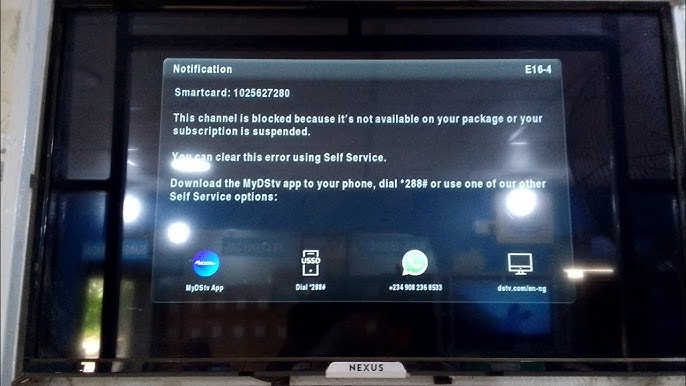
The problem is frustrating because you have already paid, but your DSTV is still showing messages like:
- Subscription expired
- E16 error
- E143 error
- Account suspended
- No access
- Payment not received
The good news is that this problem can be fixed easily in most cases.
In this guide, you will learn the real reasons DSTV subscription may not reflect after payment and the exact steps to solve it fast.
Why DSTV Subscription Is Not Showing After Payment in Nigeria
Before jumping into the solution, it is important to understand why it happens.
Here are the most common reasons.
1. Payment Delay from the Bank or Payment Platform
Sometimes, the bank or payment app processes the transaction successfully on your side, but the money has not reached DSTV immediately.
This is common when:
- network is slow
- DSTV servers are busy
- there is downtime in the payment system
2. Wrong Smartcard Number or IUC Number Was Used
This is a very common mistake in Nigeria, especially when you pay through:
- POS agent
- friend
- bank teller
- cyber cafe
If you mistakenly entered another person’s smartcard number, DSTV will activate the wrong account.
3. Your Decoder Was Off During Payment
DSTV decoder needs to be switched on to receive activation messages.
If your decoder has been off for days or weeks, it may not receive the subscription update immediately.
4. You Paid for the Wrong Package
Some people pay for a lower package by mistake.
For example:
- You wanted Compact, but paid for Padi
When this happens, some channels will still remain locked and you may think your subscription did not reflect.
5. DSTV System Delay
DSTV sometimes experiences system delays, especially during:
- festive seasons
- weekends
- end of the month
- major football match days
6. Temporary Smartcard Error
Your decoder may have smartcard issues that prevent it from receiving the authorization message.
What to Do If DSTV Subscription Is Not Showing After Payment (Step-by-Step)
If your DSTV payment has not reflected, follow these steps one after the other.
Step 1: Confirm That Your Payment Was Successful
The first thing to do is confirm the payment status.
Check:
- bank SMS alert
- transaction receipt
- transaction history on your bank app
- Opay or PalmPay transaction record
Make sure the payment shows successful and not pending.
If it is still pending, wait for some minutes or hours.
Step 2: Confirm You Paid with the Correct Smartcard/IUC Number
Many Nigerians make this mistake, so always check it.
To find your DSTV smartcard/IUC number:
- Press Menu on your remote
- Go to Information
- Select Smartcard / IUC Number
Now compare it with the number on your payment receipt.
If the number is different, then the subscription was paid to the wrong decoder.
In that case, you may need to contact the platform you used to pay.
Step 3: Restart Your DSTV Decoder
Sometimes, the decoder needs a reboot to refresh itself.
To restart:
- Switch off your DSTV decoder
- Unplug it from power
- Wait for 2 to 5 minutes
- Plug it back
- Switch it on and allow it to boot fully
Then check if your channels have returned.
Step 4: Ensure Your Decoder Has Signal
Your decoder cannot receive subscription updates if the signal is weak.
To check signal:
- Press Menu
- Go to Settings
- Select Satellite Settings
- Click Signal Information
If signal strength is low or 0%, you may have dish issues.
Fix your signal first before expecting your subscription to reflect.
Step 5: Reset Your DSTV Decoder (Most Effective Fix)
This is the fastest and most effective solution.
Resetting the decoder sends an authorization message to your DSTV box.
How to Reset DSTV Decoder Using MyDStv App
- Download and open MyDStv App
- Login to your DSTV account
- Tap Manage
- Select Reset Decoder
- Choose your smartcard number
- Tap Reset
After resetting, keep your decoder on for 10 to 30 minutes.
How to Reset DSTV Decoder Using the DSTV Website
- Visit DSTV official website
- Login to your DSTV account
- Go to Manage Account
- Select Reset Decoder
- Submit the reset request
Wait for the reset to take effect.
How to Reset DSTV Decoder Through WhatsApp Support (If Available)
DSTV also supports customer service through WhatsApp in some regions.
You can message them, provide your smartcard number, and request a reset.
Step 6: Stay on Channel 100 and Wait
After payment and reset, you must leave the decoder on.
Do this:
- Switch to Channel 100 (DSTV Info Channel)
- Leave the decoder ON
- Wait for 10 to 30 minutes
This step is very important.
If you switch off the decoder too quickly, the activation message may not reach it.
Step 7: Check If You Paid for the Correct DSTV Package
If some channels are still locked, it may be because you paid for a package that does not include them.
To confirm your active package:
- Check it on the MyDStv App
- Check your SMS confirmation
- Check on your bank receipt description
If you paid for a lower package, you may need to upgrade.
Step 8: Clear Error Code Messages
When DSTV subscription does not reflect, you may see errors like:
- E16
- E143
- E30
In many cases, these errors clear after decoder reset and waiting.
But if the error persists, repeat the reset process again after 10 minutes.
Step 9: Contact DSTV Customer Care
If you have done everything above and your subscription is still not showing after 1 hour, contact DSTV support.
When contacting them, provide:
- Smartcard/IUC number
- payment receipt
- transaction reference number
- amount paid
- date and time of payment
DSTV can manually activate your subscription.
How Long Does DSTV Subscription Take to Reflect After Payment in Nigeria?
Normally, it reflects within:
- 2 to 10 minutes (fast processing)
- 10 to 30 minutes (common)
- up to 1 hour (when systems are busy)
If it takes more than 1 hour, it is likely a delay or wrong payment details.
Common Mistakes Nigerians Make After Paying DSTV Subscription
Avoid these mistakes:
1. Switching Off the Decoder Immediately
You must keep it on to receive activation.
2. Paying and Not Resetting Decoder
Sometimes reset is required.
3. Paying to Wrong Smartcard Number
Always confirm the IUC number.
4. Assuming It Will Reflect Instantly
Network delays are common.
How to Prevent DSTV Payment Not Reflecting Issue
To avoid this issue next time:
Always Pay Using Official Channels
Use:
- MyDStv app
- bank apps
- official DSTV payment portals
Always Save Your Payment Receipt
If something goes wrong, you will need proof.
Keep Your Decoder On During Payment
Especially if your subscription already expired.
Confirm Smartcard Number Before Paying
This is the biggest mistake people make.
Frequently Asked Questions (FAQs)
Why Is My DSTV Still Showing E16 After Payment?
It usually means the decoder has not received the activation signal. Reset your decoder and leave it on Channel 100.
Can DSTV Subscription Reflect Without Reset?
Yes, sometimes it reflects automatically, but reset speeds it up.
What Channel Should I Stay On After Payment?
Stay on Channel 100 or any channel showing the error.
How Can I Know If DSTV Has Received My Payment?
You may get an SMS confirmation, and your MyDStv app will also show active subscription.
What If I Paid the Wrong Smartcard Number?
You will need to contact the payment platform or DSTV customer care immediately with your receipt.
To Round This Up
If your DSTV subscription is not showing after payment in Nigeria, the issue is usually caused by payment delay, wrong smartcard number, or decoder not receiving activation signal.
To fix it quickly:
- Confirm payment is successful
- Confirm smartcard number used
- Restart your decoder
- Check signal
- Reset decoder through MyDStv app or website
- Stay on Channel 100 for 10 to 30 minutes
- Contact DSTV customer care if needed
In most cases, following these steps will restore your channels within minutes.