
If your DSTV is suddenly showing Error E16, don’t panic. This is one of the most common DSTV problems in Nigeria, and in most cases, it is very easy to fix without calling a technician.
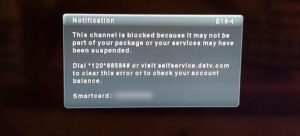
DSTV Error E16 usually happens when your decoder cannot access the channels you paid for. It often appears after your subscription has expired or when your payment has not been updated on the DSTV system.
In this guide, you will learn what DSTV Error E16 means, why it happens, and the exact steps to fix it quickly.
What Does DSTV Error E16 Mean?
DSTV Error E16 means:
“Your subscription is not active or your decoder is not authorized to show channels.”
In simple terms, it means your DSTV decoder is currently not receiving access to your subscribed package.
When this happens, DSTV will block the channels, and your screen will show Error E16.
Common Reasons Why DSTV Error E16 Happens in Nigeria
Here are the major reasons you may be seeing DSTV Error E16:
1. Your Subscription Has Expired
This is the most common reason. If your subscription has ended, DSTV will automatically stop showing channels until you renew.
2. Your Payment Has Not Reflected
Sometimes, you may pay and still see Error E16 because the payment has not updated on the DSTV system.
3. Wrong Smartcard Number Was Used for Payment
If you paid with the wrong IUC number or smartcard number, the payment will not activate your decoder.
4. Decoder Has Been Off for Too Long
If your decoder has been switched off for days or weeks, it may not receive the authorization message when you renew.
5. Signal Issues
If your DSTV dish is not receiving signal properly, your decoder may not receive the update needed to clear the error.
6. Temporary DSTV System Delay
At times, DSTV may experience delays in updating subscriptions, especially during weekends, holidays, or heavy traffic periods.
How to Fix DSTV Error E16 in Nigeria (Step by Step)
Below are the best solutions that work.
Step 1: Confirm Your DSTV Subscription Status
Before doing anything, confirm whether your DSTV subscription is active.
You can check your subscription status through:
Option A: Using MyDStv App
- Download and open the MyDStv App
- Login with your DSTV account
- Check your account status
- Confirm whether your subscription is active or expired
Option B: Check via SMS
Send your smartcard number to DSTV customer care SMS line (if available for your region).
Option C: Check on USSD
Some DSTV services allow checking account status using USSD depending on your network and location.
If your subscription is expired, you need to renew before the error can clear.
Step 2: Renew Your DSTV Subscription
If your subscription has expired, the solution is to subscribe again.
You can renew DSTV through:
- Bank apps (GTBank, Access, Zenith, UBA etc.)
- Opay
- PalmPay
- POS agent
- Quickteller
- MyDStv app
- Recharge voucher
After paying, wait a few minutes to see if the channels return.
If it still shows Error E16, continue with the next steps.
Step 3: Restart Your DSTV Decoder
Sometimes, DSTV Error E16 clears after a restart.
To restart your DSTV decoder:
- Switch off the decoder from the power source
- Unplug it completely
- Wait for 2 to 5 minutes
- Plug it back and turn it on
- Allow it to boot fully
After the decoder comes on, check if the error has cleared.
Step 4: Ensure Your DSTV Decoder Has Strong Signal
Your decoder needs signal to receive authorization messages.
To check your signal strength:
- Press Menu on your remote
- Go to Settings
- Select Satellite Settings
- Click on Signal Information
If your signal strength is very low (below 40%), you may need to adjust your dish or check the cable.
A weak signal can stop your decoder from receiving the subscription update.
Step 5: Clear DSTV Error E16 by Re-Sending Authorization (Self-Service Fix)
This is the most effective method.
DSTV has a self-service option called “Reset Decoder” or “Resend Signal.” This sends an authorization message to your decoder.
How to Clear DSTV Error E16 Using MyDStv App
- Open the MyDStv App
- Login to your account
- Select Manage
- Tap Reset Decoder
- Choose your decoder/smartcard
- Click Reset
After resetting, leave the decoder on a DSTV channel and wait for 5 to 15 minutes.
How to Clear DSTV Error E16 Using the DSTV Website
- Go to DSTV official website
- Login to your account
- Select your smartcard/decoder
- Click Reset Decoder
- Submit the request
Wait for the reset to process.
Step 6: Leave the Decoder On One Channel
After payment and reset, DSTV needs time to reconnect.
To do this properly:
- Tune to Channel 100 (DSTV Information Channel) or any E16 channel
- Keep the decoder switched on
- Do not remove power
- Wait for 10 to 30 minutes
This step is important, especially if your decoder was off for a long time.
Step 7: Check If You Paid for the Correct Package
Some people subscribe wrongly and assume they paid for their old package.
Example: You were using DSTV Compact, but you mistakenly paid for DSTV Padi.
When you switch to a lower package, some channels will still show E16 because they are not included in the new plan.
So make sure your subscription package matches what you expect.
Step 8: Confirm You Used the Correct Smartcard Number (IUC)
If you paid using a wrong smartcard number, DSTV will not activate your decoder.
To confirm your smartcard number:
- Press Menu
- Go to Information
- Select Smartcard/IUC Number
Compare it with the number you used to pay.
If it is not the same, you will need to contact the payment platform you used or DSTV customer care.
Step 9: Call DSTV Customer Care If It Still Shows E16
If you have tried everything above and Error E16 is still showing after 1 hour, it may be a system issue.
At this point, contact DSTV customer care.
When calling them, be ready to provide:
- Smartcard number
- Registered phone number
- Payment details (reference number, date and amount)
They can manually refresh your account.
Common DSTV Error E16 Fix Mistakes Nigerians Make
Here are mistakes that make the issue worse:
1. Switching Off the Decoder Immediately After Payment
DSTV needs time to receive the activation signal. Always leave it on.
2. Paying and Not Resetting Decoder
Sometimes payment alone will not clear the error. You must reset.
3. Assuming It’s a Dish Problem
E16 is mostly subscription-related, not dish-related.
4. Using Wrong IUC Number
Many people make this mistake when paying through POS agents.
How Long Does It Take for DSTV Error E16 to Clear After Payment?
Normally, it should clear within:
- 2 to 10 minutes (if everything is normal)
- 10 to 30 minutes (if decoder was off for a long time)
- Up to 1 hour (if DSTV network is busy)
If it takes more than 1 hour, do a decoder reset and contact DSTV support.
FAQs About DSTV Error E16 in Nigeria
Can DSTV Error E16 Clear Itself?
Yes. Sometimes it clears automatically after payment, but resetting the decoder makes it faster.
Does DSTV Error E16 Mean My Dish Is Bad?
Not really. Most times, it is a subscription issue. Dish problems usually show E48-32 (No Signal).
What Channel Should I Stay On When Resetting DSTV?
Stay on Channel 100 or any channel showing the E16 error.
Can I Fix DSTV Error E16 Without Calling Customer Care?
Yes. In most cases, renewing your subscription and resetting the decoder solves it.
Why Is My Payment Not Reflecting on DSTV?
It could be due to network delay, wrong smartcard number, or payment platform issues.
Can I Clear DSTV Error E16 Using USSD?
Some banks and platforms allow reset through USSD, but the easiest method is the MyDStv app or DSTV website.
Recommendation
DSTV Error E16 is one of the most common DSTV problems in Nigeria, and the good news is that it is usually easy to solve.
To fix it fast:
- Confirm subscription
- Renew if expired
- Restart decoder
- Check signal
- Reset decoder through MyDStv app or website
- Leave it on Channel 100 for 10 to 30 minutes
If the error still refuses to clear, DSTV customer care can manually refresh your decoder.